Afterglow vs Shopify Checkout Blocks for Thank you pages
Shopify's free Checkout Blocks covers messages and banners on Thank you and Order status. Afterglow adds survey, order status, and discount codes.
On Basic, Shopify, and Advanced plans, Shopify’s free Checkout Blocks app is enough for static or dynamic messages and banners on the Thank you and Order status pages. Use Afterglow when you also need a post-purchase survey with CSV export, fuller order-status content, or a discount code shown after checkout.
What Checkout Blocks offers on these pages
Checkout Blocks is a free Shopify app. On the Basic plan or higher you can use its static content and dynamic content blocks, and you can place them only on the Thank you and Order status pages.
Static content is a simple text block or banner, edited in the checkout and accounts editor, with no display rules. Dynamic content supports multiple items in one block: accordion, banner, benefits, button, divider, heading, image, spacer, and text. You can add display rules, limited Markdown, and Liquid variables such as the customer’s first name.
Everything else in Checkout Blocks is Shopify Plus only, per Shopify’s Checkout Blocks help. That includes custom fields on checkout, hiding or reordering delivery and payment methods, custom order and shipping discounts, and related checkout Functions.
The App Store listing describes content blocks on Thank you and Order status for every install, and marks full checkout customization, custom fields, and method reordering as Plus.
What Afterglow offers on these pages
Afterglow adds four ready-made blocks that you place in Shopify’s checkout and accounts editor, with no theme code:
- Post-purchase survey (short answer or multiple choice; CSV export). Shows on the Thank you page only.
- Custom message.
- Order status / delivery info on the Order status page.
- Referral / discount code (one fixed code, or one unique code per order) on Pro.
It does not do conversion tracking or ad pixels, post-purchase upsell offers, carrier tracking emails, or a full loyalty program.
Side-by-side
| Checkout Blocks (non-Plus) | Afterglow | |
|---|---|---|
| Price | Free | Free plan; then $9 / $29 / $49 per month |
| Plans for Thank you / Order status content | Basic and higher (content blocks only) | Basic, Shopify, Advanced, and Plus |
| Block types on these pages | Static and dynamic content (text, banner, image, button, and related items) | Survey, custom message, order tracking, referral/discount code |
| Surveys | No | Yes (Thank you only; Free up to 100 responses/month) |
| Order status / fulfillment block | No dedicated block (use text/banner if you write it yourself) | Yes on Growth and Pro |
| Discount / referral code on the page | You can type one shared code into a content block | Yes on Pro (fixed code or one code per order) |
| Analytics | No survey answers to export | Block view and click counts when the shopper allows analytics; survey CSV export |
| Plus-only features in the same app | Full checkout blocks, custom fields, payment/delivery method controls, custom discounts | None required for Afterglow’s four blocks |
Afterglow’s plans: Free (custom message + survey with a 100-response monthly cap), Starter $9 (unlimited survey responses), Growth $29 (adds order tracking), Pro $49 (adds referral discount codes). Paid plans include a 14-day free trial.
When Checkout Blocks alone is enough
Stay on Checkout Blocks if you only need to tell customers something after purchase: a thank-you note, shipping delay banner, return policy reminder, link button, or image. That is free, made by Shopify, and designed for these two pages on non-Plus plans.
Examples that fit Checkout Blocks well:
- “Your order is in. We ship within two business days.”
- A warning banner about holiday cutoffs.
- A button linking to your help center or Instagram.
- Personalized plain text with
{{ customer.firstName }}.
For that job, installing a paid app is optional. Put the block on both Thank you and Order status if customers should see it when they reopen the order later.
When Afterglow adds something
Choose Afterglow (alone or next to Checkout Blocks) when you need behavior Checkout Blocks does not ship:
- A survey such as “How did you hear about us?” with answers you can export as CSV.
- Order tracking content that reads fulfillment status, not only a static sentence you typed.
- A discount code that is unique per order (or a fixed shareable code) generated and shown in a dedicated block.
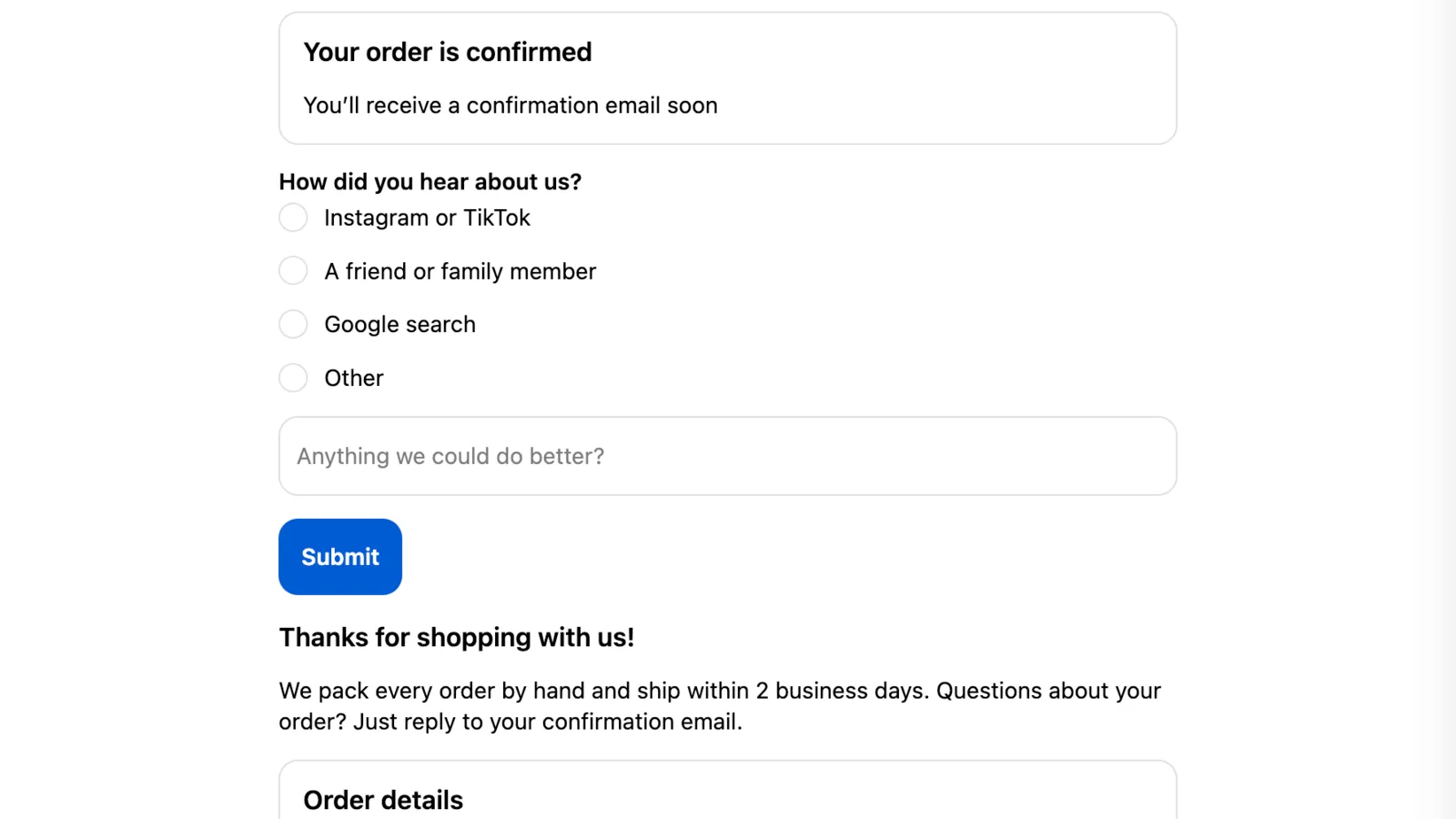
You can keep Checkout Blocks for banners and use Afterglow for the survey or code. They are separate blocks from different apps, both added in the same checkout and accounts editor.
For placement steps, see How to add Afterglow to your Thank you and Order status pages. For showing a code without scripts, see How to show a discount code on the Thank you page.
Doing this with Afterglow
Install Afterglow, turn on the blocks you need under its Blocks page, then add the Afterglow app block on the Thank you page and, if you use order-status or message content there, on the Order status page. You do this in the checkout and accounts editor: Settings › Checkout, then Edit next to your checkout configuration. Save, then place a test order.
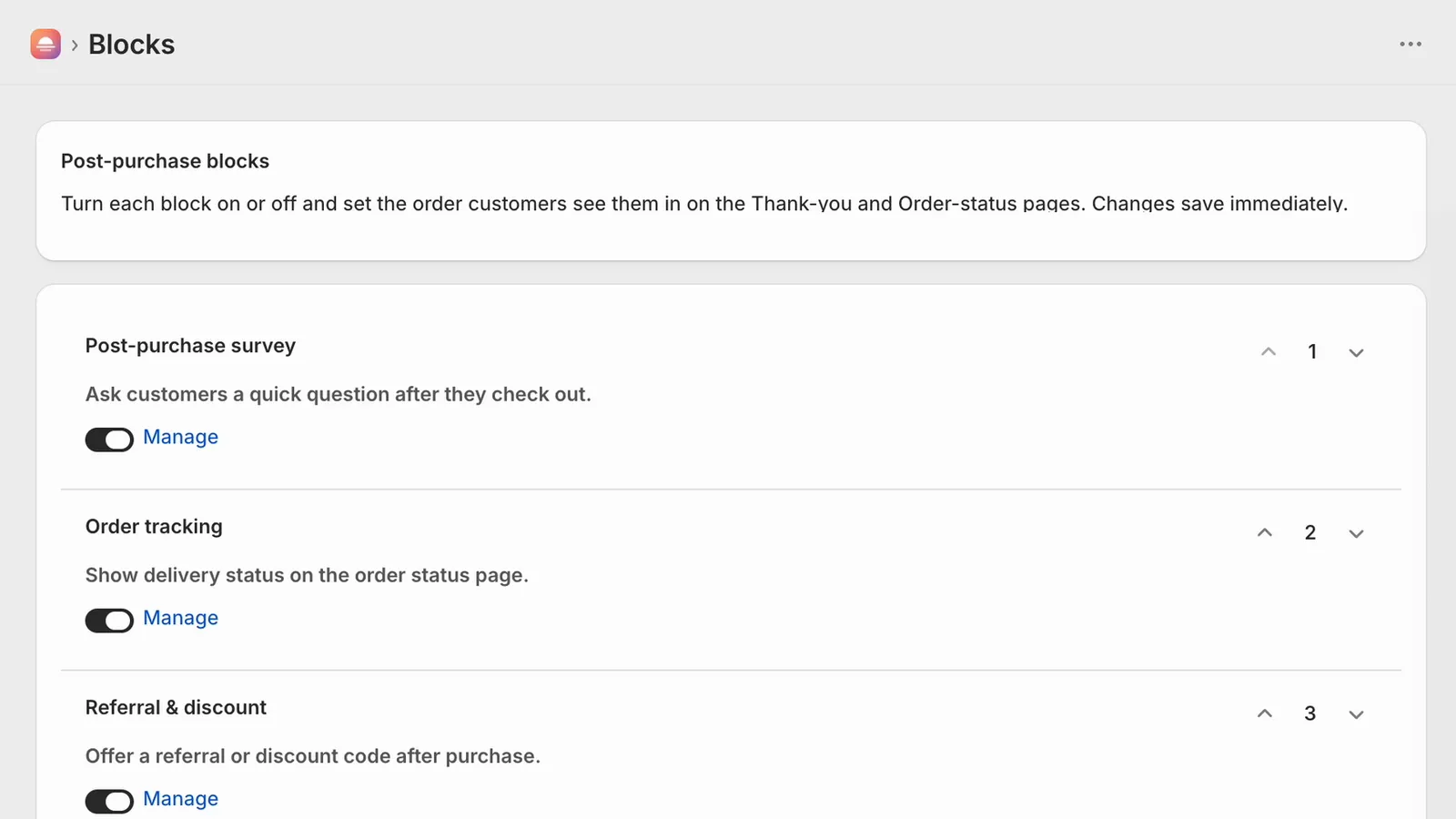
Limitation: Afterglow’s survey appears only on the Thank you page, not when a customer returns to Order status. Checkout Blocks doesn’t collect survey answers either, so for responses you need a survey block from Afterglow or another survey app.
Sources
- Shopify Checkout Blocks (Shopify App Store), checked October 11, 2026
- Checkout Blocks app (Shopify Help Center), checked October 11, 2026
- Dynamic content blocks (Shopify Help Center), checked October 11, 2026
- Static content blocks (Shopify Help Center), checked October 11, 2026
- Customizing your checkout and customer accounts with apps (Shopify Help Center), checked October 11, 2026