Shopify additional scripts are gone: what to use instead
Replace Thank you and Order status additional scripts with app pixels, custom pixels, or app blocks, mapped by what you used them for.
The additional scripts box on Thank you and Order status pages no longer runs your old code. Tracking moves to Settings › Customer events (app pixels or custom pixels). Anything shoppers should see moves to app blocks in the checkout and accounts editor.
What changed and when
As of August 28, 2025, the additional scripts section in Settings › Checkout is view-only. You cannot edit those scripts anymore.
August 26, 2026 was the deadline for non-Plus stores (Basic, Shopify, Advanced) to upgrade Thank you and Order status pages. Script tags on those pages stop for non-Plus stores on that date as well. Plus stores lost script tags on Order status earlier, on August 28, 2025.
Shopify’s upgrade path is the same for every plan: recreate tracking with web pixels, and recreate visible customizations with blocks.
Two replacements, not one
| What the old script did | Replacement | Where you set it up |
|---|---|---|
| Fired purchase or conversion events (ads, analytics) | App pixel or custom pixel | Settings › Customer events |
| Showed something on the page (message, survey, code, widget) | App block | Checkout and accounts editor: Settings › Checkout, then Edit |
A pixel is a small script that listens for customer events (page views, purchases, and similar) and sends them to a platform. An app block is a piece of an app’s content that you place on the page in the checkout and accounts editor, so shoppers see it.
Pixels load on the storefront, checkout, Thank you page, and Order status page. If your store uses a custom domain, connect a customer account subdomain (such as account.example.com), or pixels and consent tracking won’t work on the Order status page. Pixels run in a sandbox. That sandbox improves security and privacy, and it also means a pixel cannot draw buttons, forms, banners, or other interface on the page. If your old snippet both tracked and changed the page, you need a pixel for the tracking half and a block for the visible half.
Map each old use to a replacement
| Old use of additional scripts | Replacement | Free / built in? |
|---|---|---|
| Google Ads / Google Analytics conversion tracking | Google & YouTube sales channel (GA4 tags and Google tag setup); or a custom pixel / Google Tag Manager custom pixel | Channel is free to install; ad spend is separate |
| Meta (Facebook / Instagram) purchase pixel | Facebook & Instagram sales channel Meta pixel under data-sharing settings | Channel is free to install; ad spend is separate |
| TikTok ads pixel | TikTok sales channel (listing includes one-click TikTok Pixel); or a custom pixel if your setup needs it | Channel is free to install; ad spend is separate |
| Other ad or affiliate postbacks | App pixel from a compatible app, or a custom pixel in Customer events that subscribes to checkout events | Custom pixels are built into your Shopify admin; apps vary |
| Analytics (GA4, GTM, similar) | Google & YouTube for GA4; Google Tag Manager as a custom pixel; other analytics via app or custom pixel | Built-in path for GA4 via Google & YouTube |
| Post-purchase survey | App block from a survey app that supports Thank you / Order status | Not built into Shopify |
| Custom message, banner, or shipping note | Checkout Blocks static or dynamic content, or another app’s content block | Checkout Blocks is free (Shopify) |
| Discount or referral code shown after purchase | App block that displays a code; create the discount under Discounts | Discount codes are built in; showing a unique code per order needs an app |
| Order tracking details on Order status | Built-in fulfillment and Order status page features where they cover you; otherwise an order-status app block | Core order status is built in |
| Live chat or reviews widget | App block from an app that supports these pages (pixels cannot render chat or review UI) | Not built into Shopify for these pages |
| Returns, Buy again, branding, policies | Built-in Order status / checkout editor features (self-serve returns, Buy again, branding, policy footer links) | Yes, free and built in |
Shopify’s own customization reference sorts the same idea by category: use app pixels for tracking and analytics on the Thank you page, and apps or built-in features for everything else.
How to move tracking
- Open Settings › Checkout and, if an upgrade notice still appears, open the upgrade guide. The Additional scripts section lists tracking scripts Shopify detected.
- Prefer an app pixel when Shopify or the ad platform offers one. For Google, install Google & YouTube and complete the Google tag / GA4 steps. For Meta, connect a Meta pixel in Facebook & Instagram data-sharing settings. For TikTok, use the TikTok channel’s pixel integration when it fits your ads account.
- If no app matches, go to Settings › Customer events, add a custom pixel, paste code built for Shopify’s pixel APIs, save, then Connect.
- Test events in the ad or analytics platform. Then disable the old additional script in the upgrade guide so you do not double-count purchases.
- Expect some drop in reported events after you switch. Pixels respect customer consent; many old additional scripts did not.
Remove leftover pixel snippets from theme.liquid, Online Store preferences, or old checkout code so you are not firing the same conversion twice.
How to move visible content
- Install an app that offers Thank you or Order status blocks (Checkout Blocks for simple text and banners; a dedicated app for surveys or codes).
- Go to Settings › Checkout and click Edit next to your checkout configuration.
- Select the Thank you page, click ⊕ Add block, choose the app’s block, place it, and Save.
- Switch to the Order status page and add the block there too if you need it when customers reopen the order later. The two pages are separate; a block on one does not appear on the other.
- Place a test order and confirm the live Thank you page, not only the editor preview.
UI extensions for Thank you and Order status are available on Basic and higher, not only Plus. Full checkout-step customization (Information, Shipping, Payment) with UI extensions remains Plus-only.
Doing this with Afterglow
Afterglow covers the visible-content rows: a post-purchase survey (Thank you page only, CSV export), a custom message, order status / delivery info on the Order status page, and a discount or referral code block. Free includes the survey (up to 100 responses a month) and custom message. Starter is $9/month for unlimited survey responses. Growth is $29/month and adds order tracking. Pro is $49/month and adds the referral / discount code block. Paid plans include a 14-day free trial.
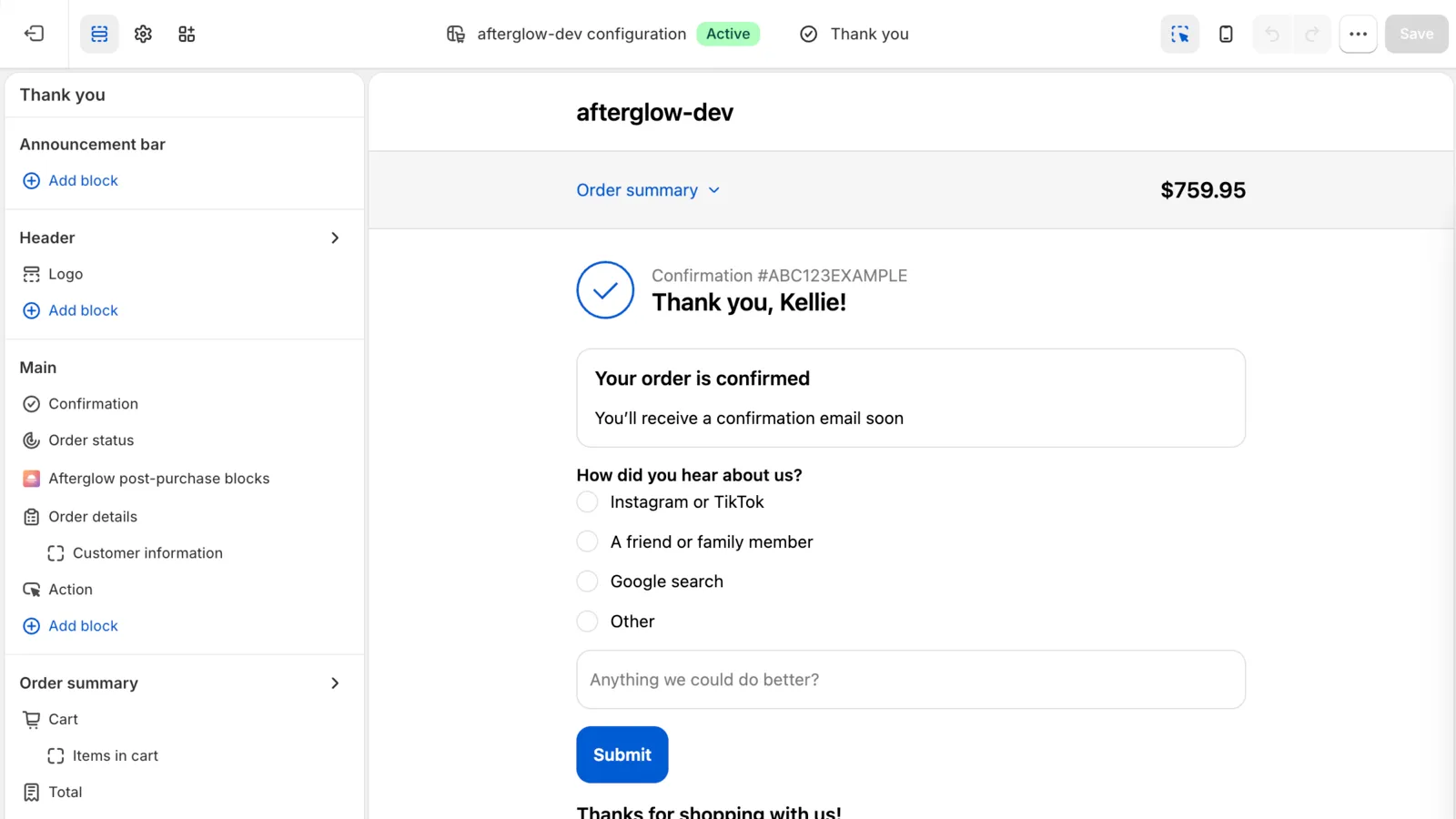
Afterglow does not do conversion tracking or ad pixels for Meta, Google, TikTok, or similar. Keep those in Customer events or the official sales-channel apps. Afterglow’s own web pixel only counts block views and clicks for shoppers who allow analytics.
Limitation: the survey shows only on the Thank you page, never on the Order status page. For steps to place the blocks, see How to add Afterglow to your Thank you and Order status pages.
Sources
- Reviewing and replacing additional scripts on your Thank you and Order status pages (Shopify Help Center), checked October 11, 2026
- Non-Plus - Upgrading and replacing your Thank you and Order status pages (Shopify Help Center), checked October 11, 2026
- Pixels overview (Shopify Help Center), checked October 11, 2026
- Pixels and customer events (Shopify Help Center), checked October 11, 2026
- Custom pixels (Shopify Help Center), checked October 11, 2026
- Manage your custom pixels (Shopify Help Center), checked October 11, 2026
- Customizing your checkout and customer accounts with apps (Shopify Help Center), checked October 11, 2026
- Customization options for Thank you and Order status pages (Shopify Help Center), checked October 11, 2026
- Checkout Blocks app (Shopify Help Center), checked October 11, 2026
- Dynamic content blocks (Shopify Help Center), checked October 11, 2026
- Static content blocks (Shopify Help Center), checked October 11, 2026
- Meta pixel (Shopify Help Center), checked October 11, 2026
- Facebook and Instagram by Meta (Shopify Help Center), checked October 11, 2026
- Setting up Google Analytics 4 (Shopify Help Center), checked October 11, 2026
- Google & YouTube (Shopify Help Center), checked October 11, 2026
- Discount codes (Shopify Help Center), checked October 11, 2026
- Order status script tags (Shopify.dev), checked October 11, 2026
- checkout.liquid (Shopify.dev), checked October 11, 2026
- About Thank you and Order status page customization (Shopify.dev), checked October 11, 2026
- Google & YouTube (Shopify App Store), checked October 11, 2026
- Facebook & Instagram (Shopify App Store), checked October 11, 2026
- TikTok (Shopify App Store), checked October 11, 2026
- Shopify Checkout Blocks (Shopify App Store), checked October 11, 2026